By Arslan Ahmad
Most "top system design interview questions" lists have the same problem. They hand you thirty question titles, a few YouTube links, and leave you exactly where you started. Knowing that "design Instagram" gets asked is not preparation. Knowing what to say in the first four minutes, which component you are expected to reach for, and which trade-off the interviewer is waiting to hear you name: that is preparation.
If you have never sat a system design interview at all, the beginner's guide covers how the round works and what to learn before attempting these questions. This page assumes you are past that point.
So this list is built differently. Every question below comes with the requirements you should state, the core design, the one genuinely hard part, the trade-off that earns you credit, and the mistake that costs candidates the most. The list is curated down to thirty questions that are actually asked, not padded with trivia.
You will also find a repeatable method at the top. Thirty questions is a lot to memorize. A method that works on all thirty is a lot easier, and it is what senior interviewers are really testing.
Every question links to a free, full-length lesson on Design Gurus if you want the complete walkthrough with diagrams.
How this list is organized
| Part | What it covers | Questions | Who gets asked |
|---|---|---|---|
| Part 1 | Concept questions that open the interview | 10 | Everyone, especially mid-level |
| Part 2 | Classic design problems you should do cold | 12 | Every level |
| Part 3 | Harder and more modern design problems | 8 | Senior and staff |
| Bonus | Object-oriented design questions people confuse with system design | 6 | Backend and Java roles |
Concept questions are usually the warm-up or the follow-up. Design problems are the main event. If you only have a weekend, do Part 1 and the first six questions of Part 2.
A method that works on any system design question
Before the questions, the method. Every strong answer follows the same seven moves. Interviewers are scoring the moves, not the diagram.
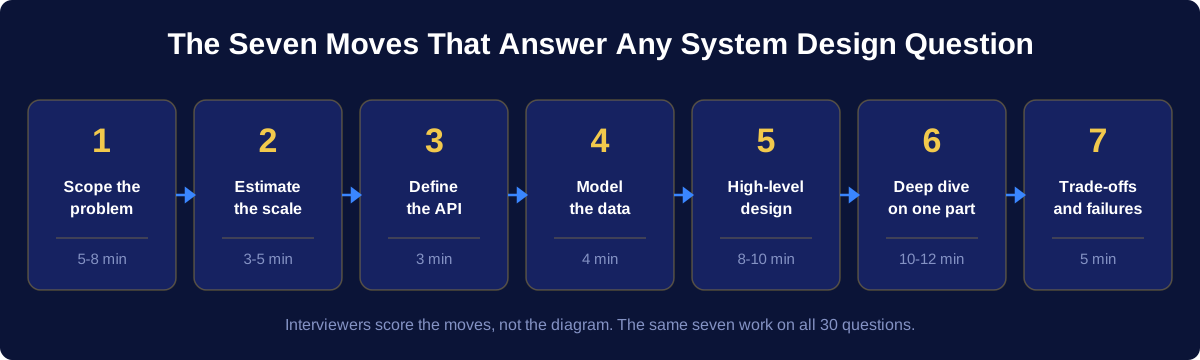
1. Clarify and scope. Separate functional requirements (what the system does) from non-functional ones (how well it does it). Say them out loud and get agreement before drawing anything. Most failed interviews are lost here, not at the end. See functional vs non-functional requirements.
2. Estimate. Traffic, storage, bandwidth, and how read-heavy or write-heavy the system is. You do not need precision. You need the order of magnitude, because it decides whether you shard, whether you cache, and whether a single database is fine. See back-of-the-envelope estimations.
3. Define the API. Three or four endpoints with their parameters. This forces you to be concrete and it surfaces disagreements about scope early.
4. Design the data model. What entities exist, what the access patterns are, and only then which storage engine fits. Choosing the database before knowing the access pattern is a classic tell.
5. Draw the high-level design. Clients, load balancer, service layer, storage, cache. Keep it to six or seven boxes. A crowded first diagram reads as a lack of judgment.
6. Find the bottleneck and scale it. Pick the single component that breaks first at the scale you estimated, and fix that one. Then go deep on one subsystem, not all of them.
7. Name the trade-offs and failure modes. What happens when a node dies, when the cache is cold, when traffic spikes ten times. This is the difference between a mid-level pass and a senior pass. See system design trade-offs in interviews.
Time budget for a 45-minute interview
| Phase | Minutes | Signal you are sending |
|---|---|---|
| Requirements and scope | 5 to 8 | You do not build the wrong thing |
| Estimation | 3 to 5 | Your design is grounded in numbers |
| API and data model | 5 to 7 | You think in interfaces and access patterns |
| High-level design | 8 to 10 | You can structure a system |
| Deep dive on one component | 10 to 12 | You have real depth somewhere |
| Trade-offs, failures, wrap-up | 5 | You have operated systems, not just drawn them |
The full step-by-step version of this method is in the system design master template and the step-by-step interview guide.
Part 1: 10 concept questions that open the interview
These get asked as warm-ups, as follow-ups inside a design question, and as the entire interview at some companies. Short, precise answers score better than long ones.
At a glance
| # | Question | What it really tests | Lesson |
|---|---|---|---|
| 1 | Horizontal vs vertical scaling | Whether you know scaling has limits and costs | Scalability |
| 2 | What is load balancing | Whether you understand health checks and session state | Load balancing |
| 3 | Load balancer vs API gateway | Whether you can separate traffic distribution from traffic policy | LB vs API gateway |
| 4 | SQL vs NoSQL | Whether you choose from access patterns, not fashion | SQL vs NoSQL |
| 5 | What is sharding | Whether you know what sharding breaks, not just what it fixes | Data partitioning |
| 6 | Explain the CAP theorem | Whether you repeat the slogan or understand the real choice | CAP theorem |
| 7 | Strong vs eventual consistency | Whether you can tie consistency to product requirements | Strong vs eventual |
| 8 | How does caching work | Whether you have thought about invalidation | Caching |
| 9 | What is a CDN | Whether you know what belongs at the edge | CDN |
| 10 | Polling vs WebSockets vs SSE | Whether you pick a transport from the traffic shape | Real-time transports |
1. What is the difference between horizontal and vertical scaling?
Short answer. Vertical scaling means giving one machine more CPU, memory, or disk. Horizontal scaling means adding more machines and spreading load across them. Vertical scaling is simpler because the application does not change, but it has a hard ceiling, it costs more per unit of capacity at the top end, and the single machine stays a single point of failure. Horizontal scaling has no practical ceiling and improves availability, but it forces you to handle stateless services, data partitioning, and coordination.
What the interviewer is checking. That you know vertical scaling is not wrong, it is just limited. A good answer says: start vertical because it is cheap in engineering time, move horizontal when you hit the ceiling or when availability requirements demand more than one machine.
Go deeper: Scalability and scalability and performance.
2. What do you understand by load balancing?
Short answer. A load balancer sits in front of a pool of servers and distributes incoming requests across them, using an algorithm such as round robin, least connections, or consistent hashing. It also health-checks the pool and stops sending traffic to a failed instance, which is where most of its availability value comes from. Load balancers appear in more than one place in a real system: between clients and web servers, between web servers and application servers, and between application servers and databases.
What the interviewer is checking. Two follow-ups almost always come. First, which algorithm and why. Second, what happens to session state when a user's requests land on different servers, which is your cue to talk about stateless services and moving session data into a shared store.
Go deeper: Load balancing algorithms and stateless vs stateful load balancing.
3. What is the difference between an API gateway and a load balancer?
Short answer. A load balancer distributes traffic. An API gateway applies policy. The gateway is a single entry point for clients that handles authentication, rate limiting, request routing to the right microservice, protocol translation, request and response transformation, and aggregation of several service calls into one response. A load balancer does none of that, it just spreads requests across identical instances. In practice a load balancer usually sits in front of the gateway, and the gateway then routes to services that each sit behind their own load balancer.
What the interviewer is checking. Whether you can articulate that these are different layers rather than competing choices. The strongest answer names one concrete thing a gateway does that a load balancer cannot, such as enforcing per-client rate limits or fanning out one client request to three services.
Go deeper: Load balancer vs API gateway and API gateway vs reverse proxy.
4. SQL or NoSQL: how do you choose?
Short answer. Choose from the access pattern and the consistency requirement, not from scale alone. Pick a relational database when the data is highly relational, when you need multi-row transactions with strong guarantees, when the query patterns are varied and ad hoc, or when correctness of money-like data matters. Pick a NoSQL store when the access pattern is known and narrow, when you need to write and read enormous volumes by a single key, when the schema varies per record, or when you need to scale writes horizontally without the coordination cost of distributed transactions.
What the interviewer is checking. That you do not say "NoSQL because it scales". Modern relational databases shard too. The good answer is: "these queries are the ones that matter, and here is the store whose data model makes them cheap".
Go deeper: SQL vs NoSQL and ACID vs BASE.
5. What is sharding, and what does it break?
Short answer. Sharding splits one logical dataset across multiple database instances so that each holds a subset. You choose a shard key and a partitioning method: range-based, hash-based, or directory-based. Range partitioning gives you efficient range scans but creates hotspots when the key is skewed, for example by time. Hash partitioning spreads load evenly but destroys range queries. Consistent hashing lets you add or remove nodes while moving only a fraction of the keys.
What the interviewer is checking. What sharding costs you. Cross-shard joins become application-level work, transactions that span shards need two-phase commit or a saga, secondary indexes on non-shard-key columns require scatter-gather queries, and rebalancing a badly chosen shard key later is painful. Naming those costs is what separates a memorized answer from a real one.
Go deeper: Data partitioning, partitioning methods, common problems with partitioning, and consistent hashing.
6. Explain the CAP theorem
Short answer. In a distributed system that is experiencing a network partition, you can preserve consistency or availability, not both. If the network splits, either you refuse writes on the minority side to keep every replica in agreement (CP), or you accept writes on both sides and reconcile later (AP). Partition tolerance is not optional in a real network, so CAP is really a choice about what to do during a partition.
What the interviewer is checking. Whether you know CAP describes behavior during a partition only, and whether you know PACELC. PACELC extends it: if there is a partition, choose availability or consistency, else (in normal operation) choose latency or consistency. That "else" branch is where almost all real systems spend their time, and it is why a strongly consistent system is usually a slower system even when nothing is broken.
Go deeper: CAP theorem, trade-offs in CAP, and PACELC theorem.
7. Strong vs eventual consistency: when do you use each?
Short answer. Strong consistency means every read returns the most recent write, which requires coordination and therefore costs latency and availability. Eventual consistency means replicas converge over time, and a read may return stale data for a window measured in milliseconds to seconds. Use strong consistency where a stale read causes a correctness bug that a user can act on: account balances, inventory decrements, ticket seat assignment, unique username registration. Use eventual consistency where staleness is invisible or harmless: like counts, view counts, feed ordering, follower lists, search indexes.
What the interviewer is checking. That you apply consistency per operation rather than per system. The best answers say something like "reads of the timeline can be eventually consistent, but the write that debits the wallet must not be", which shows you think in terms of the product.
Go deeper: Strong vs eventual consistency.
8. How does caching work, and how do you handle invalidation?
Short answer. A cache stores the results of expensive work close to where it is needed so repeated requests skip the work. You choose where (client, CDN, application-level, database-level), a read strategy (cache-aside, read-through, write-through, write-behind), an eviction policy (LRU is the default, LFU when popularity is stable), and an invalidation strategy (time-to-live, write-through updates, or explicit purge on change).
What the interviewer is checking. The failure modes. Name at least two: a cache stampede, where a popular key expires and thousands of requests hit the database at once, which you mitigate with request coalescing or staggered expiry, and a cold cache after a restart, which you mitigate with warming. Mention the hit ratio as the metric that tells you whether the cache is earning its keep.
Go deeper: Caching, cache read strategies, and cache invalidation.
9. What is a CDN and when does it actually help?
Short answer. A content delivery network is a geographically distributed set of edge servers that cache content close to users, so requests are served from a nearby point of presence instead of the origin. It cuts latency, absorbs traffic spikes, and reduces origin bandwidth cost. A pull CDN fetches content from origin on the first request for it and caches it. A push CDN has content uploaded to it ahead of time, which suits large files with predictable demand such as video.
What the interviewer is checking. That you know what does not belong at the edge. Personalized responses, authenticated content, and anything that changes per request are poor CDN candidates unless you separate the static shell from the dynamic parts.
Go deeper: What is a CDN and push CDN vs pull CDN.
10. Polling, long polling, WebSockets, or server-sent events?
Short answer. Short polling is the client asking on a timer, simple but wasteful and always at least one interval stale. Long polling holds the request open until there is data, which cuts empty responses but ties up a connection per waiting client. Server-sent events give you a persistent one-way stream from server to client over plain HTTP with automatic reconnect, which fits notifications, live scores, and progress updates. WebSockets give a full-duplex connection, which you need when the client also sends frequently: chat, collaborative editing, multiplayer.
What the interviewer is checking. That you pick from the traffic shape rather than reaching for WebSockets by reflex. Persistent connections cost memory per connection at the server and complicate load balancing and horizontal scaling, so the follow-up is usually "how do you scale a million open connections".
Go deeper: Polling vs long polling vs WebSockets vs webhooks and long polling vs WebSockets vs SSE.
Part 2: 12 design problems you should be able to do cold
These twelve cover the overwhelming majority of what gets asked. They are ordered roughly by difficulty. Learn them as a set, because they share components: once you can design a URL shortener you have most of what a unique ID generator needs, and once you can design Twitter you are most of the way to a news feed.
At a glance
| # | Question | Difficulty | Core skill it tests | Walkthrough |
|---|---|---|---|---|
| 11 | Design a URL shortener like TinyURL | Easy | Key generation, read-heavy caching | Lesson |
| 12 | Design an API rate limiter | Easy | Distributed counters, algorithm choice | Lesson |
| 13 | Design a unique ID generator | Easy | Coordination-free uniqueness | Lesson |
| 14 | Design Pastebin | Easy | Blob storage vs metadata separation | Lesson |
| 15 | Design a web crawler | Medium | Politeness, dedup, queue design | Lesson |
| 16 | Design autocomplete / typeahead | Medium | Trie sharding, precomputation | Lesson |
| 17 | Design Instagram | Medium | Media pipeline, feed generation | Lesson |
| 18 | Design Twitter | Medium | Fan-out strategy, celebrity problem | Lesson |
| 19 | Design a news feed | Medium | Ranking plus fan-out at scale | Lesson |
| 20 | Design Dropbox or Google Drive | Medium | Chunking, dedup, sync conflicts | Lesson |
| 21 | Design WhatsApp or Messenger | Medium | Delivery guarantees, presence | Lesson |
| 22 | Design YouTube or Netflix | Hard | Transcoding pipeline, CDN economics | Lesson |
11. Design a URL shortening service like TinyURL or bit.ly
Requirements to state. Shorten a long URL to a short unique alias, redirect from alias to original, optional custom alias, optional expiry. Non-functional: highly available (a dead redirect breaks every link ever shared), redirect latency in the low tens of milliseconds, links are effectively immutable.
Numbers that shape the design. Assume 100 reads per write. That single ratio drives everything: it means this is a read-heavy system, so you cache aggressively and you optimize the redirect path above all else.
Core design. A key generation service produces short unique keys, either by encoding an auto-incrementing counter in base62 or by pre-generating keys offline into a key store that servers claim in batches. Store the alias-to-URL mapping in a key-value store partitioned by hash of the alias. Put a cache in front holding the hot aliases. Redirect with a 302 if you want to keep counting clicks, or a 301 if you want browsers to stop asking you.
The hard part. Generating keys that are unique without a coordination bottleneck. Hashing the long URL and truncating produces collisions you then have to detect and resolve. A counter is collision-free but is itself a single point of contention unless you hand out ranges to each server.
The trade-off to name. 301 versus 302 is a real one: 301 offloads traffic to browser caches but destroys your analytics. Say it out loud.
Common mistake. Storing the mapping in a relational database with an index on the long URL, then discovering the write path needs a uniqueness check on a very large column.
Full walkthrough: Designing a URL shortening service like TinyURL.
12. Design an API rate limiter
Requirements to state. Limit requests per client per time window, return a clear response when the limit is exceeded, and do it accurately across a fleet of servers with minimal added latency.
Core design. Pick an algorithm and defend it. A fixed window counter is trivially simple but allows a burst of double the limit across a window boundary. A sliding window log is exact but stores a timestamp per request. A sliding window counter approximates the log at a fraction of the memory. A token bucket allows controlled bursts, which is usually what you want for a public API. A leaky bucket smooths output to a constant rate, which is what you want in front of a fragile downstream. Keep counters in a shared in-memory store so every instance sees the same state, and place the limiter at the API gateway.
The hard part. Distributed accuracy. Per-instance counters are fast but let a client with N instances in front of it get N times the limit. A shared store is accurate but adds a network hop to every request and becomes a hotspot for a heavy client.
The trade-off to name. Strict accuracy versus latency. A common resolution is local counters with periodic synchronization, accepting small overshoot in exchange for speed.
Common mistake. Not saying what happens when the counter store is unavailable. Fail open (allow traffic, risk overload) or fail closed (reject traffic, risk an outage)? Having an opinion here reads as operational experience.
Full walkthrough: Designing an API rate limiter and token bucket vs leaky bucket.
13. Design a unique ID generator for a distributed system
Requirements to state. IDs must be unique across all nodes, roughly sortable by time, generated without a round trip to a central service, and compact enough to store in 64 bits.
Core design. The standard answer is a Snowflake-style layout: a timestamp in the high bits, a machine or datacenter identifier in the middle, and a per-millisecond sequence counter in the low bits. Uniqueness comes from the machine ID, which is assigned at startup by a coordination service. Sortability comes from the timestamp being the most significant field.
The hard part. Clock skew and clock rewind. If the machine clock moves backwards, you can regenerate an ID you already issued. Handle it explicitly: refuse to issue until the clock catches up, or borrow from the sequence.
The trade-off to name. UUIDv4 needs no coordination at all but is 128 bits and not sortable, which makes it a poor primary key for a B-tree index because inserts land randomly. Snowflake needs a machine ID assignment but gives you 64 bits and locality.
Full walkthrough: Design a unique ID generator.
14. Design Pastebin
Requirements to state. Users paste text, get a URL, optionally set expiry and visibility. Reads far exceed writes. Size limit per paste.
Core design. This is a URL shortener plus a blob. Keep metadata (key, owner, created, expiry, size) in a database and the paste body in object storage, referenced by key. Separating them is the whole point: metadata is small and queried, bodies are large and only fetched. Cache hot pastes. Run a background cleanup job for expired entries rather than deleting on the read path.
The hard part. Making expiry cheap. Scanning the whole table for expired rows does not scale. Partition by expiry bucket, or let a lazy delete happen on access with a periodic sweeper for the rest.
Full walkthrough: Designing Pastebin.
15. Design a web crawler
Requirements to state. Crawl a set of seed URLs and everything reachable from them, respect robots.txt and per-domain politeness, avoid re-crawling the same content, prioritize important pages, and re-crawl on a schedule that reflects how often pages change.
Core design. A URL frontier holds what to fetch next, structured as two layers: front queues for priority and back queues for politeness, with one back queue per host so you never hammer a single domain. Fetchers pull from the frontier, a DNS resolver with its own cache does hostname lookups, a parser extracts links, and a duplicate detector filters out URLs and content already seen. Store fetched documents in blob storage.
The hard part. Duplicate detection at scale. Exact URL dedup with a hash set does not fit in memory across billions of URLs, so you use a Bloom filter as a cheap membership pre-filter and accept its false positives. Content-level duplicates (the same page at many URLs) need a similarity hash rather than an exact one.
The trade-off to name. Politeness versus throughput. Per-host rate limiting is what keeps you from being blocked, and it is also what caps your crawl rate.
Common mistake. Forgetting crawler traps: infinite calendars, session IDs in URLs, and dynamically generated link cycles. Mention a depth limit and a per-domain URL budget.
Full walkthrough: Designing a web crawler and Bloom filters.
16. Design autocomplete (typeahead suggestion)
Requirements to state. As a user types a prefix, return the top few completions ranked by popularity, in under about 100 milliseconds so it feels instant. Suggestions update as new queries become popular, but not necessarily in real time.
Core design. Build a trie where each node stores the top K completions for the prefix at that node, precomputed. Then a lookup is a walk down the prefix path and a read of a precomputed list, not a search. Shard the trie by prefix range across servers, and route the request to the right shard at the load balancer. Update the trie offline from a log of queries, aggregated hourly or daily, and swap in the new snapshot.
The hard part. Updating without blocking reads. You do not mutate a live trie under load. You build a new snapshot offline and swap the pointer, or you apply updates to a replica and rotate it in.
The trade-off to name. Freshness versus latency. Precomputing top-K at every node is what makes reads fast, and it is exactly what makes updates expensive.
Common mistake. Designing a search over the query log at request time. Autocomplete is a precomputation problem, not a search problem.
Full walkthrough: Designing typeahead suggestion.
17. Design Instagram
Requirements to state. Upload photos and videos, follow other users, view a feed of posts from people you follow, search by user. Non-functional: very read-heavy, high availability, feed latency in the low hundreds of milliseconds, eventual consistency for the feed is acceptable.
Core design. Split the write path from the read path. Uploads go to object storage through a dedicated media service that generates thumbnails and multiple resolutions asynchronously, with only the metadata written to the database synchronously. Serve media through a CDN. Store posts, users, and follow relationships in separate partitioned stores. Generate the feed by fan-out on write for ordinary users, precomputing each follower's timeline into a cache when a post is created.
The hard part. Users with tens of millions of followers. Fanning out one post to 50 million timelines is not something you do inline. The standard resolution is a hybrid: fan out on write for normal accounts, and for high-follower accounts pull their recent posts at read time and merge them into the timeline.
The trade-off to name. Fan-out on write gives fast reads and expensive writes. Fan-out on read gives cheap writes and slow reads. The hybrid exists because neither works alone at Instagram scale.
Common mistake. Serving images from the application servers. Media should never touch your service layer on the read path.
Full walkthrough: Designing Instagram.
18. Design Twitter
Requirements to state. Post short messages, follow users, see a home timeline of posts from people you follow, see a user timeline, search. Non-functional: read-heavy by roughly two orders of magnitude, timeline generation under a second, availability over strict consistency.
Core design. Same architecture as the Instagram feed, with tweets instead of media. Write path: a tweet is appended to the author's user timeline and fanned out into follower home timelines held in an in-memory store. Read path: fetch the precomputed home timeline from cache, hydrate the tweet IDs into full objects, merge in anything from high-follower accounts. Search is a separate inverted index built from a stream of tweet events.
The hard part. The celebrity problem, again, plus timeline storage. Storing a materialized timeline per user is a lot of memory, so you cap it (a few hundred entries) and fall back to generating older pages on demand.
The trade-off to name. How much of the timeline you materialize. More materialization means faster reads and much more memory.
Common mistake. Treating search as an afterthought. If the question includes search, the honest answer is a separate indexing pipeline fed asynchronously, not a LIKE query.
Full walkthrough: Designing Twitter and designing Twitter search.
19. Design a news feed system
Requirements to state. Aggregate posts from friends, pages, and groups, rank them by relevance rather than pure recency, support infinite scroll, and stay fresh.
Core design. A feed publishing service handles the write path with the hybrid fan-out described above. A feed building service handles the read path: fetch candidate posts, filter out what the user has already seen or should not see, score each candidate with a ranking model, sort, and paginate. Cache the ranked result for a short window so a scroll does not re-rank on every page.
The hard part. Ranking makes the feed non-deterministic between page fetches, which produces duplicate or missing items during infinite scroll. Solve it with a cached ranked candidate set per session plus a cursor, not an offset.
The trade-off to name. Recency versus relevance. A ranked feed engages better and makes freshness guarantees harder to reason about.
Full walkthrough: Designing Facebook's news feed.
20. Design Dropbox or Google Drive
Requirements to state. Upload and download files, sync across a user's devices, share with other users, keep version history, work offline and reconcile on reconnect.
Core design. Split files into fixed-size chunks (a few megabytes each) on the client. Hash each chunk. Upload only chunks the server does not already have, which gives you deduplication and resumable uploads for free. A metadata service stores the file tree, chunk lists, and version vectors. A synchronization service pushes change notifications to connected clients. Chunks live in object storage.
The hard part. Conflict resolution when two devices edit the same file offline. There is no universally correct answer, so state your policy: last-write-wins with a conflict copy preserved is what most consumer products do, because silent data loss is worse than a duplicate file.
The trade-off to name. Chunk size. Small chunks give better deduplication and cheaper incremental sync, and they multiply metadata volume and request count.
Common mistake. Uploading whole files. Chunking is the entire insight of this question.
Full walkthrough: Designing Dropbox.
21. Design WhatsApp or Facebook Messenger
Requirements to state. One-to-one and group chat, delivery and read receipts, online presence, message history, push notification when offline. Non-functional: low latency, messages must not be lost, ordering within a conversation must be consistent.
Core design. Clients hold a persistent WebSocket to a gateway. A session service tracks which gateway holds which user's connection. A message service persists each message before acknowledging it, then routes it to the recipient's gateway, or queues it and triggers a push notification if the recipient is offline. Store messages partitioned by conversation ID so a conversation's history is contiguous. Groups fan out to each member's queue.
The hard part. Ordering and exactly-once delivery. Networks retry, so you need client-generated message IDs for idempotency, and a per-conversation sequence number so clients can order and detect gaps.
The trade-off to name. Presence is expensive. Real-time presence for every contact of every user is a large amount of chatter, so most systems batch presence updates and accept a few seconds of staleness.
Common mistake. Acknowledging a message to the sender before it is durably stored. If the server crashes, the sender believes it was delivered.
Full walkthrough: Designing Facebook Messenger.
22. Design YouTube or Netflix
Requirements to state. Upload video, transcode into multiple resolutions and formats, stream with adaptive bitrate, search, recommend, and count views. Non-functional: enormous storage, enormous egress bandwidth, playback start in under a couple of seconds, availability over consistency.
Core design. The upload path writes the raw file to object storage and emits an event. A transcoding pipeline, built as a directed acyclic graph of tasks (split into segments, transcode each segment in parallel across a worker fleet, package into HLS or DASH, generate thumbnails), produces every rendition. Completed renditions are pushed to a CDN. Playback is the client requesting a manifest, then fetching segments, stepping bitrate up or down based on measured throughput. Metadata, search index, and recommendations are separate services.
The hard part. The transcoding pipeline is where the interesting engineering is, and most candidates skip it. Splitting a video into segments so they can be transcoded in parallel, then reassembling, is the design decision that turns a multi-hour job into a multi-minute one.
The trade-off to name. Pre-transcode every rendition (fast playback, wasted compute and storage on videos nobody watches) versus transcode popular renditions on demand (cheaper, slower first play). Real systems do the popular renditions eagerly and the rest lazily.
Common mistake. Underestimating that this is a bandwidth and CDN economics problem more than a compute problem.
Full walkthrough: Designing YouTube or Netflix.
Part 3: 8 harder and more modern design questions
These show up for senior and staff roles, and increasingly for mid-level roles at companies that have run out of new things to ask about Twitter.
| # | Question | What makes it hard | Walkthrough |
|---|---|---|---|
| 23 | Design Uber | Real-time geospatial matching | Lesson |
| 24 | Design Ticketmaster | Contention on a scarce resource | Lesson |
| 25 | Design a payment system | Correctness and idempotency | Lesson |
| 26 | Design a notification system | Multi-channel fan-out and dedup | Lesson |
| 27 | Design Yelp or a proximity service | Spatial indexing | Lesson |
| 28 | Design a distributed key-value store | Replication and conflict resolution | Lesson |
| 29 | Design a recommendation system | Offline training plus online serving | Lesson |
| 30 | Design a flash sale system | Extreme write spike on limited stock | Lesson |
23. Design Uber (or Lyft, Ola, Grab)
Requirements to state. Drivers publish location continuously, riders request a ride, the system matches a rider to a nearby available driver, both sides track the trip live, and the trip ends with a fare and a payment.
Core design. Two services with very different shapes. A location service ingests a driver location update every few seconds, which is an enormous write volume, and keeps current positions in an in-memory geospatial index. A matching service queries that index for candidate drivers near the rider, applies business rules, and offers the trip. Trip state lives in a durable store. Location history goes to a stream for analytics, not to the hot path.
The hard part. The spatial index. A naive latitude and longitude range query does not scale. Use a grid: QuadTrees for adaptive cell sizes in dense cities, or geohashing / H3 cells for fixed addressing that is easy to shard. Partition by cell so a query touches one or a few shards.
The trade-off to name. Location update frequency. More frequent updates give better matches and multiply your write volume linearly.
Common mistake. Persisting every location update to a relational database. That write volume is the defining constraint, and the answer is to keep current position in memory and stream the history elsewhere.
Full walkthrough: Designing Uber backend.
24. Design Ticketmaster or a seat booking system
Requirements to state. Browse events, view a seat map, hold seats while the user completes checkout, confirm the booking, release abandoned holds. Non-functional: no double booking, ever, and the system must survive a spike when a popular event goes on sale.
Core design. A seat is a scarce, uniquely identifiable resource, so this is a locking problem. On selection, place a short-lived hold (a few minutes) with an expiry, using a transaction or a distributed lock keyed on the seat. On payment success, convert the hold to a booking. On expiry, a sweeper releases it. Put a queue in front of the checkout path so a spike becomes a line rather than a stampede.
The hard part. Double booking under concurrency. Optimistic concurrency (version the seat row, retry on conflict) works when contention is low. Pessimistic locking works when contention is high, which for a hot event it is. Say which you would use and why.
The trade-off to name. Hold duration. Long holds make checkout comfortable and reduce effective inventory. Short holds increase conversion pressure and abandonment.
Common mistake. Making the seat map read path strongly consistent. Showing a seat as available that has just been held is fine. Confirming two bookings for it is not. Consistency belongs on the write, not the browse.
Full walkthrough: Designing Ticketmaster.
25. Design a payment system
Requirements to state. Accept a payment, call an external payment service provider, record the result, handle refunds, reconcile against the provider's ledger, and never charge a customer twice.
Core design. Model money movement as an append-only ledger with double-entry accounting rather than a mutable balance column. Every payment request carries a client-supplied idempotency key, stored with the result so a retry returns the original outcome instead of charging again. Multi-step flows (reserve funds, ship, capture) are a saga with explicit compensating transactions, because a distributed transaction across your service and a third-party provider is not available to you. Reconcile nightly against the provider's settlement file and alert on any mismatch.
The hard part. Exactly-once semantics across a network you do not control. You cannot get it from the network, so you get it from idempotency keys plus a durable record of every attempt.
The trade-off to name. Synchronous confirmation gives a better user experience and couples you to the provider's latency and availability. Asynchronous confirmation is more robust and forces you to design a pending state into the product.
Full walkthrough: Design a payment system.
26. Design a notification system
Requirements to state. Deliver notifications across push, email, and SMS, respect user preferences and quiet hours, support both transactional and bulk sends, retry failures, and never spam a user with duplicates.
Core design. An event ingestion API writes to a durable queue. A preference service decides which channels a given user should receive on. Per-channel workers pull from their own queue and call the relevant third-party provider, with a rate limiter per provider. A template service renders content. A deduplication layer keyed on (user, event, window) prevents repeats. Track delivery status per notification for analytics and for retry decisions.
The hard part. Third-party providers fail and rate limit. Retries need exponential backoff with jitter and a dead letter queue, and bulk sends need to be throttled so a marketing campaign does not exhaust the quota that transactional alerts depend on. Separate queues per priority class.
The trade-off to name. At-least-once delivery with deduplication is achievable. Exactly-once through an external provider is not, so you design for duplicates and suppress them.
Full walkthrough: Designing a notification system and messaging systems.
27. Design Yelp or a nearby-friends service
Requirements to state. Find places or people within a radius of a location, ranked by distance and rating, with search and filters, updating as the user moves.
Core design. The read-heavy Yelp variant and the write-heavy nearby-friends variant diverge. For static places, precompute a spatial index (QuadTree or geohash grid) and cache aggressively, since places rarely move. For moving users, the index must accept continuous updates, so you keep it in memory and shard by cell. In both cases the query is: resolve the location to a cell, search that cell and its neighbors, then filter and rank.
The hard part. Uneven density. A fixed grid puts a million entries in the Manhattan cell and three in a rural one. QuadTrees adapt by subdividing dense regions, at the cost of a more complex structure to shard and rebuild.
The trade-off to name. Cell size. Large cells mean fewer shards to query and more results to filter out. Small cells mean precise results and more cells per query.
Full walkthrough: Designing Yelp or nearby friends.
28. Design a distributed key-value store
Requirements to state. Get and put by key, scale horizontally, survive node failure without data loss, and stay available during a partition.
Core design. This is the Dynamo design and it is worth knowing by name. Partition the key space with consistent hashing on a ring so adding a node moves only its neighbors' keys. Replicate each key to the next N nodes on the ring. Use quorum reads and writes (R + W > N gives you read-your-writes) so you can tune the consistency and latency balance per operation. Detect conflicting concurrent writes with vector clocks and resolve them at read time or in the application. Repair divergence in the background with Merkle trees, and propagate membership with a gossip protocol. Handle temporary node failure with hinted handoff.
The hard part. Conflict resolution. Once you accept writes on both sides of a partition, you have to decide what a conflict means. Last-write-wins is simple and loses data. Vector clocks preserve causality and push the merge decision to the application.
The trade-off to name. Tunable consistency is the point of the design. W=N gives strong durability and poor write availability. W=1 gives fast writes and stale reads.
Full walkthrough: Dynamo deep dive, quorum, and consistent hashing.
29. Design a recommendation system
Requirements to state. Given a user, return a ranked list of items they are likely to engage with, in tens of milliseconds, refreshed as their behavior changes.
Core design. Split it into offline and online. Offline: a pipeline consumes the event stream (views, clicks, watch time), trains a model, and writes user and item embeddings plus precomputed candidate sets to a fast store. Online: a candidate generation step pulls a few hundred items cheaply (by collaborative filtering neighbors, by embedding similarity via approximate nearest neighbor search, by popularity), then a ranking step scores those candidates with a heavier model, then business rules apply diversity and filtering.
The hard part. Cold start. A new user has no history and a new item has no interactions. Fall back to popularity and content-based features, and design an exploration slot into the results so new items get impressions.
The trade-off to name. Model freshness versus serving cost. Retraining hourly captures trends and is expensive. The common compromise is a slow-moving heavy model plus fast-updating features.
Full walkthrough: Design a recommendation system for Netflix.
30. Design a flash sale system
Requirements to state. Sell a limited quantity of an item at a fixed start time, to a spike of traffic orders of magnitude above baseline, without overselling and without taking the rest of the site down.
Core design. Three ideas carry the answer. First, shed load early: serve the product page from a CDN, and admit only a bounded number of users into the purchase path using a virtual waiting room. Second, decrement stock in a single fast atomic counter in memory rather than in the database, and treat that counter as the source of truth for whether the sale is still open. Third, make the purchase asynchronous: the fast path only reserves a slot and enqueues the order, and the slow path (payment, order creation, inventory write-back) drains the queue at a sustainable rate.
The hard part. Overselling. An atomic decrement prevents it at the counter, but the counter and the durable order record can diverge if a reservation is never converted, so you need a reconciliation job and a reservation expiry.
The trade-off to name. Isolating the flash sale path from the rest of the site costs duplicated infrastructure and is what keeps a sale from becoming a full outage.
Full walkthrough: Design a flash sale for an e-commerce site and read-heavy vs write-heavy systems.
Bonus: six questions that are not system design at all
Almost every "system design interview questions" list mixes in questions like "design a parking lot" and "design a vending machine". Those are real interview questions, but they are a different interview. They test object-oriented design, also called low-level design: classes, responsibilities, relationships, and design patterns. There is no load balancer in the answer, and drawing one is a signal you did not understand the question.
| Question | What it actually tests | Patterns usually expected |
|---|---|---|
| Design a parking lot | Class modeling, pricing strategy | Strategy, Factory |
| Design a vending machine | Explicit state modeling | State |
| Design an ATM | State plus transaction boundaries | State, Chain of Responsibility |
| Design a library management system | Entity relationships, borrowing rules | Observer, Repository |
| Design an elevator system | Scheduling under constraints | State, Strategy |
| Design a card game such as chess or blackjack | Rules encapsulation, extensibility | Strategy, Command |
The tell is in the wording. "Design a parking lot" with a whiteboard and no scale numbers is object-oriented design. "Design a parking reservation service for 10,000 garages" is system design. If it is ambiguous, ask. Asking is itself a good signal.
If your loop includes both, prepare them separately. We wrote up the distinction in system design vs object-oriented design interviews, and reviewed the dedicated course for the low-level side in Grokking the Object-Oriented Design Interview.
What different companies ask
The thirty questions above transfer everywhere, but the emphasis shifts by company.
| Company | Emphasis | What to over-prepare |
|---|---|---|
| Amazon | Ownership and operations, tied to leadership principles | Failure modes, on-call implications, cost, and the "what would you do differently" follow-up |
| Depth on distributed systems fundamentals | Consistency models, coordination, storage internals, back-of-the-envelope rigor | |
| Meta | Product sense inside the design | Feed, messaging, and social graph problems, plus why a design serves the user |
| Netflix | Streaming, CDN, and resilience | Video pipeline, adaptive bitrate, graceful degradation, chaos-style failure reasoning |
| Microsoft | Practical architecture and clarity | Clean layered designs, API contracts, and the ability to explain a trade-off simply |
| AI-first companies | Serving infrastructure for models | Inference serving, GPU scheduling, embeddings and vector search, streaming responses, cost per request |
The last row is the one that has changed most recently. Questions like "design a system that serves a large language model to a million users" or "design a retrieval-augmented search over a company's documents" are now common, and they are still system design questions: the bottleneck is a scarce, expensive, high-latency resource, and everything you know about queueing, caching, batching, and graceful degradation applies directly.
Five mistakes that sink otherwise good answers
1. Designing before scoping. Drawing boxes in minute two means you are designing something nobody asked for. Spend the first five minutes on requirements, and say the non-functional ones out loud. See things to avoid during a system design interview.
2. Breadth with no depth. Touching twelve components for thirty seconds each reads as shallow. Interviewers want one subsystem taken all the way down. Pick the interesting one and go.
3. Naming technologies instead of properties. "I would use Kafka" is weaker than "I need a durable, replayable, partitioned log because consumers must be able to reprocess". Say the property, then name the tool.
4. No numbers. A design with no estimate cannot justify itself. You do not need to be right, you need to be in the right order of magnitude, and you need to show that the number changed a decision.
5. Silence when stuck. The interview measures how you think. Thinking silently produces no signal. Narrate the options you are weighing, including the one you reject.
A four-week plan for these thirty questions
| Week | Focus | Output |
|---|---|---|
| 1 | Part 1 concepts plus the method | Be able to answer all ten concept questions in under two minutes each |
| 2 | Questions 11 to 16 | Whiteboard each from a blank page in 40 minutes |
| 3 | Questions 17 to 22 | Same, plus one deep dive per design |
| 4 | Part 3 plus mock interviews | Two timed mocks, then re-do the two you did worst on |
The single highest-value activity in week 4 is doing a design out loud, under time, to another person. Reading a solution feels like learning and is not the same skill as producing one at a whiteboard while someone interrupts you.
Where to go deeper
Every lesson linked above is free to read on Design Gurus. If you want the structured version:
- Grokking the System Design Interview is the original course this whole category grew out of: 83 lessons across 5 chapters, 15 full design case studies, 237 quizzes, roughly 20 hours. It covers most of Part 2 and several of Part 3.
- System Design Fundamentals is where to start if Part 1 felt shaky. It is the building blocks, over 100 text lessons, no case studies.
- System Design Patterns covers the reusable pieces (consistent hashing, quorum, write-ahead log, leader and follower, and more) that recur across every design in Part 3.
- Advanced System Design Interview, Volume II is the senior and staff layer: 142 lessons, 36 hours, deep dives into Dynamo, Cassandra, Kafka, Chubby, GFS, HDFS, and BigTable, plus mock interview walkthroughs.
Not sure which one you need? We compared them in System Design Fundamentals vs Grokking the System Design Interview and mapped the whole catalog in Every Grokking Course, Explained.
Frequently asked questions
How many system design questions are there really? The question titles are effectively unlimited, but the underlying problems are not. Almost everything reduces to a handful of shapes: a read-heavy lookup service, a write-heavy ingestion pipeline, a feed or fan-out problem, a real-time messaging problem, a geospatial problem, a contention-on-scarce-inventory problem, and a large-file storage problem. Learn the shapes and new question titles stop being new.
How long does it take to prepare? With a solid distributed systems background, two to four weeks of focused practice. Without one, expect eight to twelve weeks, because you need the fundamentals before the case studies mean anything.
Do junior engineers get system design interviews? Increasingly yes, but the bar is different. Juniors are expected to produce a reasonable high-level design and know the components. Senior candidates are expected to drive the scoping, name trade-offs unprompted, and go deep on at least one subsystem. Staff candidates are expected to question the requirements themselves.
Is there one right answer to these questions? No, and interviewers who imply otherwise are not interviewing well. There are defensible answers and indefensible ones. What is graded is whether your design follows from the requirements you stated and whether you can explain why you rejected the alternatives.
Should I memorize these thirty designs? Memorize the components and the method, not the diagrams. A memorized diagram falls apart the moment the interviewer changes a requirement, which they will do deliberately.
What if I have never worked on a system at this scale? Say so, and reason from first principles anyway. Interviewers know most candidates have not built a system serving a hundred million users. What they are testing is whether you can reason about scale, not whether you have already done it.
How much detail should the first diagram have? Six or seven boxes. Client, load balancer, service layer, database, cache, and the one component unique to this problem. Add detail as the conversation goes, and add it where the interviewer shows interest.
What is the fastest way to improve? Timed practice out loud. Take a question from Part 2, set a 40-minute timer, and talk through it from a blank page. Record it. The gaps are obvious on playback and almost impossible to notice while you are in it.
Are AI and machine learning system design questions replacing the classics? They are being added, not substituted. A model serving question still comes down to queueing, batching, caching, and graceful degradation. Do the classics first, then add the AI-specific layer.
Can I use these questions to interview candidates? Yes. The most useful ones for interviewing are the questions with a genuine hard part: Ticketmaster for contention, Dropbox for conflict resolution, Uber for spatial indexing, and the flash sale for load shedding. Each has a decision that separates candidates who have reasoned about it from candidates who have read a summary.
Key takeaways
- Thirty question titles matter less than one repeatable method: scope, estimate, define the API, model the data, draw the high-level design, find the bottleneck, name the trade-offs.
- Part 1 concepts get asked as warm-ups and as follow-ups inside every design question. Short precise answers beat long ones.
- The twelve questions in Part 2 share components. Learn them as a set and each one gets faster.
- The advanced questions in Part 3 each have exactly one genuinely hard part. Find it, and go deep there.
- Parking lots, vending machines, and elevators are object-oriented design questions, not system design questions. Prepare them separately.
- Practice out loud, under time, from a blank page. It is a different skill from reading solutions.
Start with the system design master template, then work the twelve core problems in order. The rest follows.